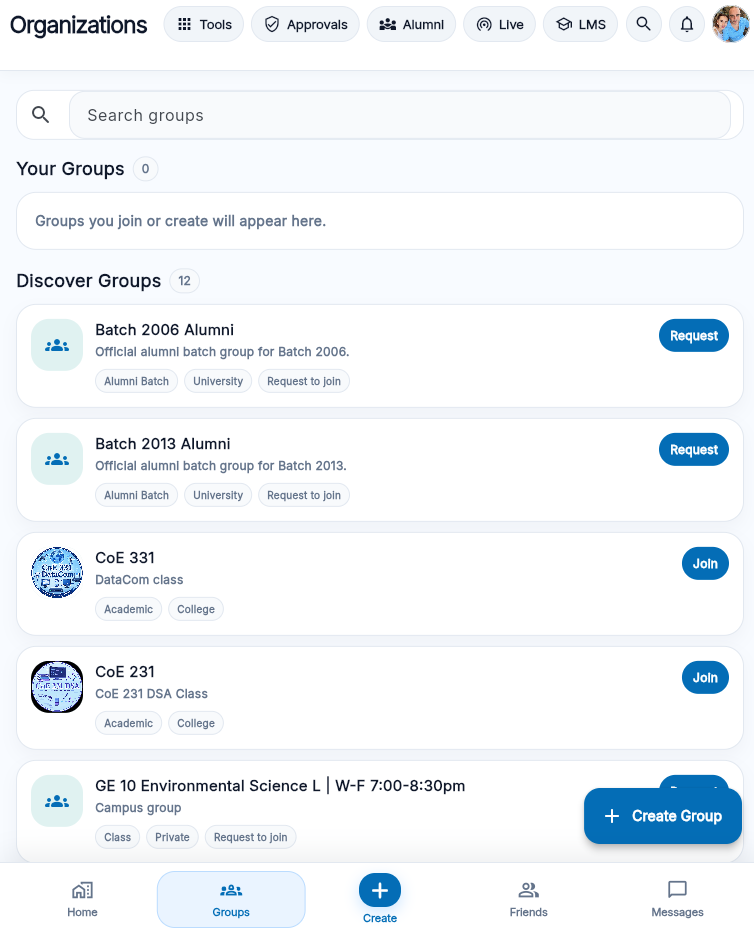
1. Set up the group with a clear purpose.
A group should tell users what it is, who it serves, and what type of activity belongs there. Use a complete group name, a short description, and simple posting rules. Avoid vague names that could confuse users into thinking the group is an official office, department, or university channel unless that authority exists and can be verified.
Good group descriptions answer basic questions: Is this for a class, organization, alumni batch, hobby, project, department-related community, tutoring circle, or event team? Who may join? What posts are allowed? Who manages the page? Where should members go for official information?
Recommended
“Engineering Study Circle — peer study group for review sessions, notes discussion, and tutoring referrals.”
Avoid
Names or posts that imply official authority when the group is only a student-run community page.
2. Make announcements readable and specific.
Organization posts should be easy to understand on a phone. Start with the main point, then add the time, place, eligibility, requirements, contact person, and deadline. Use short paragraphs. Avoid screenshots of long text when the information can be typed directly; typed text is easier to read, search, translate, and copy.
- Use a clear title or first sentence.
- Include date, time, location, and deadline where relevant.
- State who the announcement applies to.
- Add a contact person or support path if users have questions.
- Edit or comment with corrections if details change.
Practical rule: if a student cannot understand the post in ten seconds on a phone, rewrite it before publishing.
3. Treat membership as a responsibility.
Members should understand that group pages are shared spaces. They should not spam, derail announcements, attack other members, post unrelated promotions, collect personal information without a legitimate reason, or use the group to pressure students into joining activities.
Group leaders should set expectations early. A short pinned post can explain the group's purpose, posting rules, reporting path, and reminder that official information must be confirmed through official channels when required.
4. Handle events and activities carefully.
If a group uses MyNORSU Social to promote an activity, the post should explain the nature of the activity, who is organizing it, where it will happen, and whether any fee, registration, equipment, or permission is required. Avoid creating urgency without reason. Avoid using unclear claims such as “approved” or “official” unless that is true.
- Confirm details before posting.
- State whether the activity is student-led, organization-led, or official.
- Update the post if time, venue, or requirements change.
- Remove outdated announcements when they can mislead users.
5. Moderate with consistency.
Group moderation should be predictable. Remove posts that are unsafe, abusive, misleading, unrelated, or privacy-invasive. Do not remove posts only because a leader dislikes fair criticism. If a post violates rules, explain briefly when appropriate and apply the same standard to similar cases.
Serious issues should be escalated instead of handled through argument. These include harassment, threats, child safety concerns, fake organization accounts, suspicious fundraising, impersonation, scams, or requests for private documents.
Useful group rules to publish
- Post only content related to the group purpose.
- No harassment, threats, impersonation, or personal attacks.
- No collection of sensitive personal information without a clear reason.
- No fake announcements, fake approvals, or misleading official claims.
- Use official university channels for official academic or administrative confirmation.
Real scenario: a fundraising drive that needs a paper trail
Situation. A student organization wants to run a fundraiser through its MyNORSU Social page — selling merchandise to cover event costs.
What to do. Post the purpose, target amount, price per item, collection point, and the officer responsible for funds before collecting any payment. Keep a simple running total visible to members, and post a closing update showing how much was raised and what it covered.
Why it matters. Fundraising without a visible paper trail is one of the fastest ways a student org loses member trust — and it is also the pattern scammers copy when running fake fundraisers. Transparency protects the organization as much as the members.
Frequently asked questions
Can our organization page look official if we are university-recognized?
Recognition status can be stated ("recognized student organization"), but the page itself is still a community page unless it is directly operated by a university office — say so plainly to avoid confusion.
How many people can manage one organization page?
There is no fixed cap, but keeping a short, named list of admins (not the whole officer roster) makes it clear who is accountable for what gets posted.
What if a former officer still has admin access after stepping down?
Remove access as part of your organization's handover checklist each term — this is one of the most common sources of unauthorized posts on group pages.
Can we link to an external group chat from our page?
Yes, but state clearly what the external chat is for, since MyNORSU Social's reporting tools only cover activity that happens on the platform itself.